
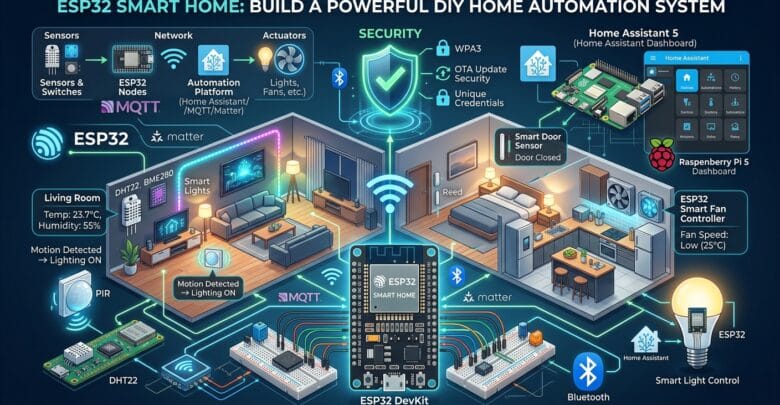
The ESP32 is one of the most capable and affordable microcontrollers for building a DIY smart home, thanks to its built-in Wi-Fi, Bluetooth, GPIO, and low-power features. For a scalable system, ESP32 devices can work with platforms such as Home Assistant, MQTT, and Matter to connect sensors, controls, and automation.
Key Takeaway: The ESP32 is an excellent foundation for DIY smart-home projects because it combines wireless connectivity, GPIO, processing power, and low cost in a compact platform. For a robust system, use ESP32 nodes for hardware control and let Home Assistant, MQTT, or Matter handle communication and higher-level automation.
What Is an ESP32 Smart Home?
An ESP32 smart home uses ESP32-based devices as connected sensors, controllers, switches, and actuators throughout a home.
A typical system might use one ESP32 to monitor temperature and humidity, another to control lighting, and another to detect doors or windows.
These devices can communicate over Wi-Fi or other supported protocols and integrate with a central home-automation platform such as Home Assistant.
Why ESP32 Is So Popular for Home Automation
The ESP32 offers a useful combination of:
- Built-in Wi-Fi
- Bluetooth/BLE
- Multiple GPIO pins
- ADC inputs
- PWM outputs
- I²C, SPI, and UART interfaces
- Low-power operating modes
- Dual-core variants
- A large developer and maker ecosystem
- Low hardware cost
This makes the ESP32 suitable for projects ranging from a simple Wi-Fi temperature sensor to a distributed, multi-room home automation system.
ESP32 Smart Home Architecture
A practical ESP32 smart home can be divided into three main layers:
Sensors and switches → ESP32 nodes → Network and automation platform → Actuators
The ESP32 handles the physical hardware, while the automation platform manages system-level logic.
For example, an ESP32 can measure the temperature in a room while Home Assistant decides whether a fan should turn on.
A distributed architecture also makes it easier to add new sensors or actuators without redesigning the entire system.
Best ESP32 Smart Home Projects
1. ESP32 Temperature and Humidity Sensor
A temperature and humidity sensor is one of the easiest ESP32 smart-home projects to build.
Connect a sensor such as a DHT22 or BME280 to the ESP32 and periodically send the measurements over Wi-Fi.
Possible automations include:
- Turn on a fan when the temperature exceeds a threshold.
- Notify the user when humidity becomes excessive.
- Record temperature history.
- Control heating based on room temperature.
- Display environmental readings on a dashboard.
For more detailed environmental monitoring, BME280-class sensors provide temperature, humidity, and pressure measurements in a compact package.
2. ESP32 Smart Light Controller
An ESP32 can control lighting through a suitable relay module, MOSFET circuit, or dedicated smart-light interface.
A simplified control path is:
ESP32 GPIO → Driver → Switching Device → Light or Load
The switching circuit must be selected according to the type and electrical characteristics of the load.
Important: Mains-voltage wiring is fundamentally different from low-voltage ESP32 electronics. Use appropriately rated components, proper isolation, suitable enclosures, fusing, and applicable electrical-code requirements.
For experimentation and learning, starting with a low-voltage DC load is a safer approach than working directly with household mains.
3. ESP32 Smart Door Sensor
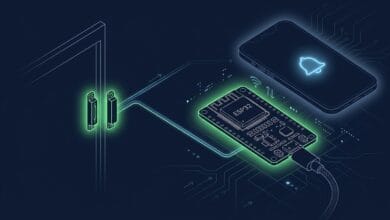
A magnetic reed switch can detect whether a door or window is open or closed.
A basic implementation can use a digital GPIO input:
Door closed → GPIO state
Door open → GPIO state changes
The ESP32 can publish the door state through MQTT or another home-automation integration.
For example, an automation could send a notification if the front door remains open for more than two minutes.
This type of sensor can also be designed for battery operation by using the ESP32’s low-power capabilities.
4. ESP32 Motion Detection
An ESP32 can interface with PIR motion sensors to detect movement in rooms, hallways, entrances, and other areas.
A typical automation flow is:
Motion detected → ESP32 → Home Assistant/MQTT → Automation → Light or other device
Motion detection becomes more useful when combined with other conditions.
For example:
Motion + nighttime + low ambient light → turn on hallway lighting
This is generally more practical than simply turning a light on every time motion is detected.
5. ESP32 Smart Fan Controller
An ESP32 combined with a temperature sensor can create an automatic fan controller.
For example:
| Temperature | Fan Action |
|---|---|
| Below 24°C | Fan OFF |
| 24–27°C | Low speed |
| 27–30°C | Medium speed |
| Above 30°C | High speed |
The actual control method depends on the fan.
For DC fans, PWM can often be used with an appropriate driver. AC fans require a different, properly engineered switching and control circuit.
ESP32 + Home Assistant
One of the strongest combinations for DIY smart homes is ESP32 with Home Assistant.
The ESP32 becomes the hardware node, while Home Assistant can provide:
- Dashboards
- Automations
- Device management
- Historical data
- Notifications
- Voice-assistant integrations
- Coordination between multiple devices
A particularly convenient firmware option is ESPHome. It allows many ESP32 devices to be configured declaratively instead of requiring an entire custom firmware application for every sensor or controller.
Why ESPHome Is Useful
Instead of implementing Wi-Fi connectivity, sensor drivers, communication, and configuration logic manually, you can define the device configuration and let ESPHome generate the firmware.
A simplified example is:
esphome:
  name: living-room-sensor

esp32:
  board: esp32dev

wifi:
  ssid: "YOUR_WIFI"
  password: "YOUR_PASSWORD"

sensor:
  - platform: bme280_i2c
    temperature:
      name: "Living Room Temperature"
    humidity:
      name: "Living Room Humidity"
The exact board definition and sensor configuration should be adjusted to the hardware being used.
Never publish real Wi-Fi credentials in source code, tutorials, repositories, or screenshots.
ESP32 + MQTT for Smart Homes
MQTT is another excellent architecture for ESP32 automation.
The basic communication model is:
ESP32 sensor → MQTT broker → Home automation server
An ESP32 could publish a temperature value to a topic such as:
home/livingroom/temperature
The message could contain a value such as:
23.7
Another ESP32 or an automation platform could subscribe to a command topic such as:
home/livingroom/light/set
This creates a flexible distributed architecture where sensors and actuators do not need to be directly connected to one another.
MQTT vs Direct HTTP
| Feature | MQTT | HTTP |
|---|---|---|
| IoT messaging | Excellent | Good |
| Publish/subscribe | Native | Not native |
| Lightweight communication | Excellent | Moderate |
| Persistent connections | Yes | Usually request-based |
| ESP32 suitability | Excellent | Good |
| Many connected devices | Excellent | Good |
| Event-driven automation | Excellent | Moderate |
For a growing ESP32-based IoT network, MQTT is often a natural choice because its publish/subscribe model fits distributed sensor and actuator systems well.
ESP32 vs Raspberry Pi for Smart Home Projects
ESP32 and Raspberry Pi are complementary platforms rather than direct replacements for one another.
| Feature | ESP32 | Raspberry Pi |
|---|---|---|
| Primary role | Microcontroller | Single-board computer |
| Wi-Fi | Usually integrated | Model-dependent |
| GPIO | Excellent | Excellent |
| Power consumption | Very low | Higher |
| Linux | No | Yes |
| Real-time hardware control | Excellent | Less ideal |
| Running Home Assistant | Limited/specialized | Excellent |
| Battery projects | Excellent | Usually less suitable |
| Sensor nodes | Excellent | Often overkill |
| Central automation server | Limited | Excellent |
A strong DIY architecture can use both platforms.
The Raspberry Pi can run the central automation software, while multiple ESP32 boards operate as inexpensive sensor and actuator nodes throughout the home.
ESP32 vs Arduino for Smart Home Automation
For connected smart-home projects, ESP32 provides several advantages over a classic Arduino Uno.
| Feature | ESP32 | Classic Arduino Uno |
|---|---|---|
| Wi-Fi | Built in | Requires additional hardware |
| Bluetooth | Available on many models | Not standard |
| Processing power | Much higher | Lower |
| RAM | Much higher | Limited |
| IoT connectivity | Excellent | Requires modules |
| Smart-home suitability | Excellent | Good for simple projects |
| Power-efficient designs | Strong | Depends on board |
| Modern IoT applications | Excellent | More limited |
For a new connected-home project, ESP32 is generally the more capable starting point when wireless connectivity and IoT integration are important.
Can ESP32 Work With Matter?
Yes, ESP32-family hardware can participate in Matter-based smart-home development, but not every ESP32 variant has identical Matter capabilities.
Matter introduces requirements beyond simply having Wi-Fi. Depending on the device and architecture, you may need appropriate radio capabilities, memory, security features, and a compatible Matter software stack.
Matter becomes particularly interesting when interoperability between different smart-home ecosystems is more important than building a completely custom MQTT-based network.
MQTT vs Matter
| Requirement | MQTT | Matter |
|---|---|---|
| Custom IoT systems | Excellent | Good |
| Simple ESP32 prototypes | Excellent | More complex |
| Standardized smart-home ecosystem | Limited | Excellent |
| Vendor interoperability | Depends on integration | Stronger |
| MQTT broker required | Usually | No |
| Developer flexibility | Very high | More constrained |
| Learning curve | Lower | Higher |
Choose MQTT when you want maximum flexibility. Choose Matter when standardized smart-home interoperability is a primary goal.
ESP32 Smart Home Wiring Basics
For low-voltage projects, a basic sensor connection follows this general pattern:
ESP32 3.3V → Sensor VCC
ESP32 GND → Sensor GND
ESP32 GPIO → Sensor signal
Before connecting any module, check:
- Operating voltage
- GPIO voltage tolerance
- Current requirements
- Logic-level compatibility
- Common-ground requirements
- Pull-up or pull-down requirements
- Inductive-load protection, when applicable
A common mistake is assuming that every module labeled “5V” can safely send a 5V logic signal directly into an ESP32 GPIO.
ESP32 GPIOs are generally designed around 3.3V logic, so incompatible signal voltages must be properly managed.
Designing a Reliable ESP32 Smart Home
A prototype can work perfectly on a workbench and still become unreliable when deployed around an entire house.
Reliability should therefore be considered part of the design from the beginning.
Use Local Automation Where Possible
Avoid making every basic function dependent on the cloud.
For example:
Motion Sensor → ESP32 → Local Automation → Light
A properly designed local automation can continue operating even when the internet connection is unavailable.
Cloud services can still be useful for remote access, notifications, and services that genuinely require internet connectivity.
Handle Wi-Fi Failures
ESP32 firmware should account for conditions such as:
- Wi-Fi disconnection
- Automatic reconnection
- MQTT broker failure
- Sensor failure
- Watchdog recovery
- Unexpected power loss
A smart-home device should fail predictably and safely rather than assuming that the network will always be available.
ESP32 Smart Home Security
Security becomes increasingly important as the number of connected devices grows.
Recommended practices include:
- Use WPA2 or WPA3 where supported.
- Never hard-code production credentials into public repositories.
- Use unique device credentials where practical.
- Keep firmware updated.
- Avoid exposing ESP32 devices directly to the public internet.
- Consider separating IoT devices onto an appropriate network or VLAN.
- Secure MQTT with authentication and encryption when required.
- Disable unnecessary services.
- Protect OTA update mechanisms.
A small sensor is still a network-connected computer, so it should be treated as part of the home’s security architecture.
How Much Does an ESP32 Smart Home Cost?
The total cost depends heavily on the number of devices and the complexity of the system.
A basic DIY system could include:
| Component | Purpose |
|---|---|
| ESP32 boards | Sensor and actuator nodes |
| BME280 or similar sensors | Environmental monitoring |
| PIR sensors | Motion detection |
| Reed switches | Door and window detection |
| Relay or MOSFET modules | Load control |
| Raspberry Pi or similar host | Central automation |
| MQTT broker | Messaging |
| Power supplies | Device power |
| Enclosures | Physical protection |
One of the major advantages of ESP32 is that the system can be built incrementally instead of requiring a complete smart-home installation from the beginning.
A Practical ESP32 Smart Home Project
A good first system is a single-room automation node.
Hardware
A practical prototype can include:
- ESP32 development board
- BME280 temperature and humidity sensor
- PIR motion sensor
- Ambient-light sensor
- Low-voltage LED or other low-voltage load
- Appropriate transistor or MOSFET driver
- USB power supply
Logic
The basic architecture can be:
Temperature + Humidity + Motion + Light Level → ESP32 → Home Assistant → Dashboard/Automation → LED or Fan
This single-room project introduces most of the concepts required for larger ESP32 IoT deployments, including sensor integration, wireless communication, automation, and actuator control.
Common ESP32 Smart Home Mistakes
1. Putting Everything on One ESP32
It may seem efficient to connect every sensor and relay to a single ESP32.
In practice, distributed nodes are often easier to maintain, troubleshoot, and expand.
2. Ignoring Power Supply Quality
Unstable power can cause seemingly random ESP32 resets.
If an ESP32 repeatedly crashes when a relay, motor, or other load activates, investigate power integrity, voltage drops, grounding, and electrical noise before assuming the firmware is defective.
3. Depending Entirely on Wi-Fi
Wi-Fi is convenient, but it should not replace good system architecture.
Critical local functions should have sensible fallback behavior whenever possible.
4. Switching Mains Loads on a Breadboard
Do not experiment with household mains wiring on a typical solderless breadboard.
Use appropriately rated and enclosed hardware, and have mains installations performed by a qualified person where required.
5. Building a Custom App Too Early
For many DIY projects, Home Assistant, ESPHome, and MQTT can provide most of the infrastructure required.
Custom software makes sense when there is a genuine requirement that existing tools cannot satisfy.
Is ESP32 Good for a Smart Home?
Yes. ESP32 is particularly well suited to DIY smart-home sensor and control nodes because it combines wireless connectivity, GPIO, processing capability, and low cost.
Its strongest use case is not necessarily replacing every commercial smart-home device.
Instead, ESP32 excels at creating custom sensors, local automations, specialized controllers, and integrations that may not be available as commercial products.
Frequently Asked Questions
Can I use ESP32 for home automation?
Yes. ESP32 can control sensors, lights, fans, displays, and other devices while communicating with a home-automation platform over Wi-Fi or other supported interfaces.
Can ESP32 work with Home Assistant?
Yes. ESP32 is commonly used with Home Assistant, particularly through ESPHome and MQTT-based architectures.
Is ESP32 better than Arduino for smart home?
For connected applications, usually yes. Built-in wireless connectivity makes ESP32 significantly more convenient for Wi-Fi-based IoT projects.
Can ESP32 control a 220V appliance?
An ESP32 should not directly switch a 220V load. A properly designed and appropriately rated isolation and switching stage is required, together with suitable electrical protection and installation practices.
Does ESP32 need the internet?
No. ESP32 can communicate over a local network without internet access. This can be useful for privacy-focused and resilient local automation.
Can ESP32 run without Wi-Fi?
Yes. ESP32 can operate as a standalone microcontroller and can also use other communication methods depending on the model and application.
Is MQTT better than Matter for ESP32?
Neither is universally better. MQTT offers greater flexibility for custom IoT architectures, while Matter is more attractive when standardized smart-home interoperability is the priority.
How many ESP32 devices can I use in one smart home?
There is no single practical number. The useful limit depends on Wi-Fi capacity, network architecture, MQTT infrastructure, power availability, RF conditions, and the design of the automation system.
Recommended ESP32 Smart Home Architecture
For a serious DIY deployment, a gradual approach works well.
Stage 1 — Prototype
ESP32 → Wi-Fi → Simple application
Start with one sensor or actuator and verify the hardware and firmware.
Stage 2 — Automation
ESP32 → Home Assistant
Add dashboards, automations, notifications, and device coordination.
Stage 3 — Distributed IoT
ESP32 nodes → MQTT → Home Assistant
Separate sensors and actuators into dedicated nodes as the system grows.
Stage 4 — Interoperability
ESP32/Matter-compatible devices → Matter ecosystem
Consider Matter when standardized interoperability between smart-home ecosystems becomes an important requirement.
This approach prevents overengineering a simple project while leaving room to scale into a much larger smart-home system.